
Getting Started
Home: your control center
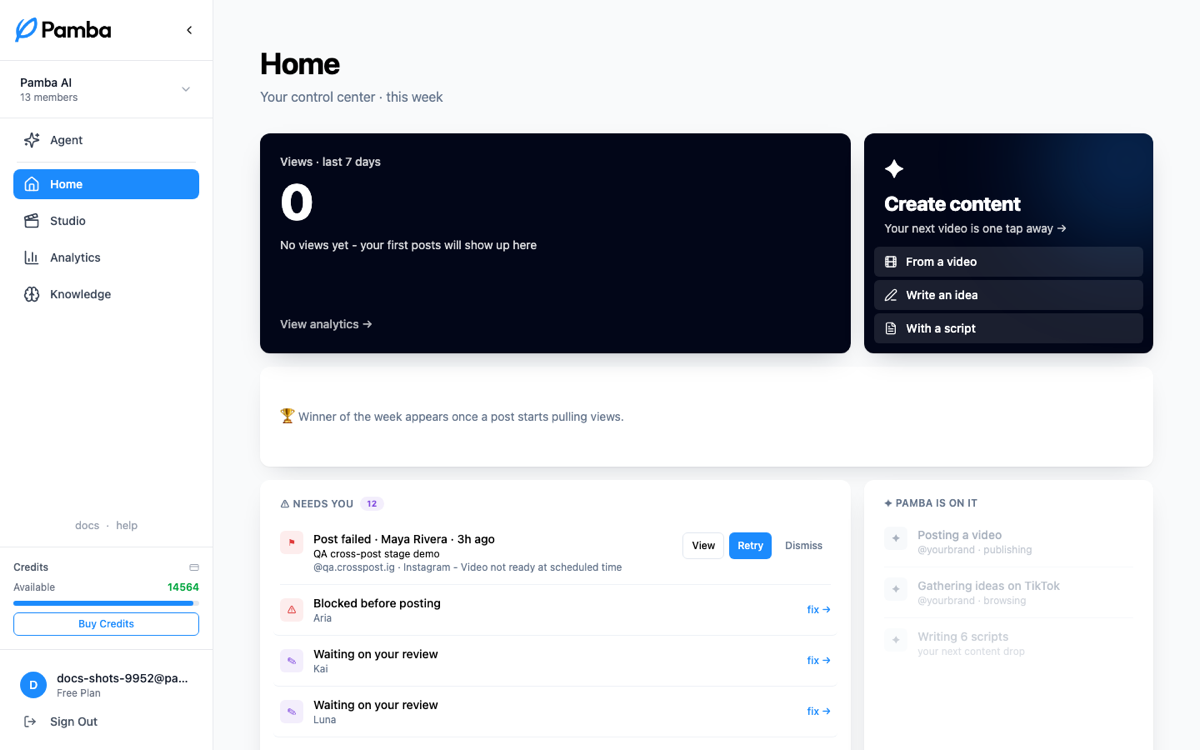
The daily check-in - views this week, your winner, what needs you, and what Pamba is working on.
Home is the first page you land on and the only one you need for a daily check-in. It answers three questions: how is my content doing, what needs me, and what is Pamba working on right now?
Views and your winner
The hero shows tracked view gains over the last 7 days across platforms, with the change against the prior week when available. The video thumbnails below it show lifetime views and a logo identifying the posting platform. Lifetime totals can include views from before tracking began, so they can be larger than the tracked seven-day gains.
Once a post starts pulling views, the winner of the week appears: your best performer, worth studying and repeating. Its view count is also a lifetime total, shown beside its platform logo.
Needs you
The human queue, most urgent first: posts that failed (with one-click Retry or Dismiss), scripts waiting for your review verdict, and anything else blocked on your judgment. If this list is empty, the machine is running on its own.
On it
What Pamba is doing right now: scripts being written, videos generating, posts queued for today. It's the "don't worry, it's happening" list.
Create content
Shortcuts into the three ways to start a video (from a TikTok link, from an idea, from your script) without leaving Home.
While you're setting up
Until your first video is created, Home shows a setup meter tracking the essentials: brand set up, first video drafted, first video created, account connected. It disappears once you're rolling; the Zero to First Post tutorial follows the same path with more hand-holding.